




NEW! Werty's Adventures II Level Editor!
From the Level Editor's help(accessed with F1):
The level editor is divided into 3 sections: the level creation area, the objects you can place(in the top left corner), and various menu options(in the top right corner).
Level editor controls:
left click: Click on the duplicates of ingame objects to create a copy that follows your cursor. Move your cursor over to where you want an object to be and left click. Note that the object following your cursor does not vanish. Clicking on the menu options selects them.
right click: Right click on an object while not in testing mode to delete it.
spacebar(while editing): clears the object(s) following your cursor. (as you potentially could have all of them following the mouse at the same time)
T key: Begins a test session of the level.
E key: Ends a test session of the level.
Level editor menu option buttons:
Enhanced Difficulty: This button brings the difficulty to about that of the first Werty's Adventures by dropping the health down to 5 at the start of the level. (Another way to modify the difficulty would be to place multiple Wertys on top of each other. However, that results in Werty being able to jump infinitely high.)
Save: Creates two options: Editable or Uneditable.
Load: Creates two options: Editable or Uneditable.
Editable(saving): Saves a file that can be loaded and edited at a later date.
Uneditable(saving): Saves a file that is essentially a level in its final form. It can only be played and cannot be modified.
Editable(loading): Loads an editable file for modification.
Uneditable(loading): This is how people can play another person's level that they have distributed but do not want to allow changes to.
Special controls in the uneditable file:
Q key, R key, or spacebar: All of these restart the level. This is why the spacebar is not advised for jumping, as it would only work in the editable version. The reason these controls aren't in the editable version is because there all one must do to restart there is hit the E key and then T key. (Another reason the spacebar isn't advised is because one cannot use it for jumping on coins or aliens, or any object besides platforms.)
Items included in the level editor:
Werty: Acts like the normal Werty.
Platform(grass): An ordinary platform.
Spike: An ordinary spike.
Downward-facing spike: Although these don't appear until later in the game and I did not put some of the things that appeared between the other objects in the editor and this type of spike(aka wormholes, levers, doors, water, etc.), I decided to add them anyway.
Alien: Acts like a normal alien, but requires bumpers to direct movement.
Bumper(red circle): These are invisible in the game, but they do exist. They can be used as invisible jumping platforms, but they are used to bounce the aliens back and forth. Place one to the left and right of an alien, preferably with just the top showing above a platform so that it does not allow Werty to jump off of a large invisible object(just a small one).
Yellow Sphere: I call it a sphere, although it is more like a circle. This is the level ender, just like in the game itself, except with some modifications.
Features in level editor levels not in the original game:
Coins Left: Shows how many coins are left in the level to present an additional challenge to collect all the coins.
Yellow Sphere: Instead of taking the user to the next level, it displays a victory message, destroys itself, and provides some effects.
Download:
Werty'sAdventuresII LevelEditor 1.00.exe
Werty's Adventures II
Description:
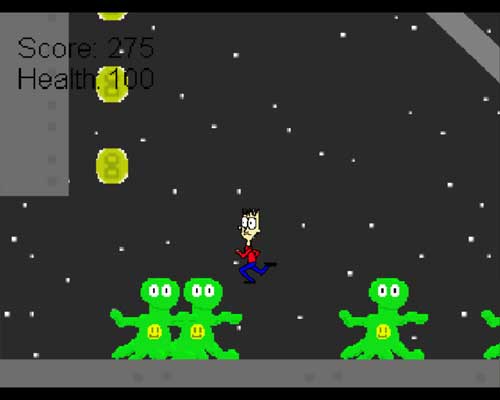
This game is a sequel to Werty's Adventures, but it is much, much better than the other. Try the 1st Werty's adventures, and I think you'll agree. In Werty's Adventures II, Werty actually is animated, there are several enemies, 2 bosses, and moving elevators. There is water to navigate, there is grass on land and bubbles underwater (as scenery objects), and there are levers, which means there are some nonlinear levels. I have added a health system. I think I have addressed most of the problems that people pointed out in Werty's Adventures. There are 2 different backgrounds, the second of which can be found after the first boss.
The story is simple: the earth is invaded by aliens (which, for some odd reason, have smilie faces on their chests), and Werty is the only one able to save the planet. First he eliminates the aliens from the planet, then invades the alien spaceship itself.
Even the controls are better than Werty's Adventures. You can use the up arrow to jump, the down arrow to slam Werty down, and the side arrows to move.
Enjoy! This game is 10 levels long, including the boss levels, but some of the levels aren't easy!
Screenshots:

Download:
Notes:
If you can't kill the bosses, make sure you are using the down arrow to slam downwards. Not doing that does not deal damage to the bosses quickly enough.
There are cheats, but they do not effect gameplay, just the appearance of the game. You can find them out if you beat the game.
The coins do not have any effect on the game. Neither does the score. You may make it a secondary goal to get all of the coins if you want, but the game doesn't care.
This game was made with Game Maker 6, made originally by Mark Overmars (who had it on www.gamemaker.nl), but he has since created a company called YoYo Games, which offers Game Maker 7.